# Digital filter
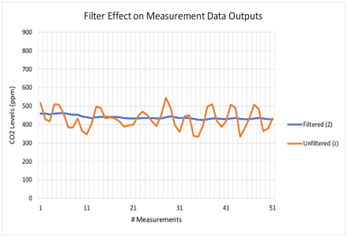
* 필터(Filtered)된 값과 필터 되지 않은(Unfiltered) CO2 값의 차이는 아래 그림과 같음
* 필터된(Filtered) CO2 값은 노이즈를 제거하여 더 정확한 값을 제공함
Digital filter 설정
* 필터 설정 범위: 1\~255( 1= Unfiltered)
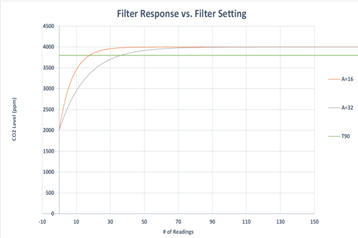
* 필터의 설정 값이 증가하면 측정 출력 응답 시간이 늘어남
* A=필터 설정 값
* A = 32 가 A = 16(default) 보다 T90에 도달하는 시간이 늘어남
Digital filter Command
Command
Description
Example
Response
A ###
CO2 필터 값 설정
A 16
A 00016
a
CO2 필터 값 확인
a
a 00016
## 소스코드
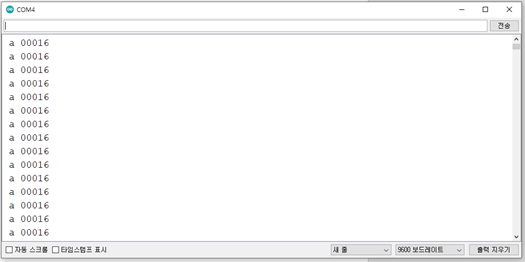
* CO2 필터 값 확인
```cpp
#include
SoftwareSerial mySerial(12, 13); //Uno Rx Tx (12 13) = SoftwareSerial
const char* Polling_mode = "K 2\r\n";
const char* Stream_mode = "K 1\r\n";
const char* Standby_mode = "K 0\r\n";
bool tx_ready;
bool rx_ready;
String str;
void setup() {
Serial.begin(9600); //시리얼 통신 초기화
mySerial.begin(9600);
while(!mySerial){} //시리얼 통신 포트가 연결되기 전까지 대기
delay(14); // power on data ready
mySerial.print(Stream_mode); //Polling 모드로 변경
}
void loop()
{
if(rx_ready == 0) // overflow 처리
{
delay(31); // Measurement data ready
if(mySerial.available()>0) //수신받은 데이터가 0 초과, 즉 데이터가 존재한다면
{ //버퍼에서 읽어드린 char의 데이터를 String 형태로 반환
str = "";
str = mySerial.readStringUntil('\n');
Serial.println(str);
rx_ready = 1;
tx_ready = 1;
}
}
else if(tx_ready == 1)
{
mySerial.print("a\r\n"); //현재 설정된 필터 값 읽기 명령어
tx_ready = 0;
rx_ready = 0;
}
}++
```
* 시리얼 모니터
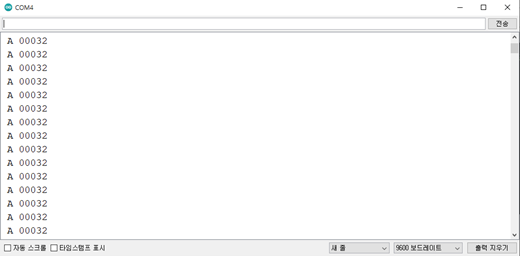
* CO2 필터 값 설정
```cpp
#include
SoftwareSerial mySerial(12, 13); //Uno Rx Tx (12 13) = SoftwareSerial
const char* Polling_mode = "K 2\r\n";
const char* Stream_mode = "K 1\r\n";
const char* Standby_mode = "K 0\r\n";
bool tx_ready;
bool rx_ready;
String str;
void setup() {
Serial.begin(9600); //시리얼 통신 초기화
mySerial.begin(9600);
while(!mySerial){} //시리얼 통신 포트가 연결되기 전까지 대기
delay(14); // power on data ready
mySerial.print(Stream_mode); //Polling 모드로 변경
}
void loop()
{
if(rx_ready == 0) // overflow 처리
{
delay(31); // Measurement data ready
if(mySerial.available()>0) //수신받은 데이터가 0 초과, 즉 데이터가 존재한다면
{ //버퍼에서 읽어드린 char의 데이터를 String 형태로 반환
str = "";
str = mySerial.readStringUntil('\n');
Serial.println(str);
rx_ready = 1;
tx_ready = 1;
}
}
else if(tx_ready == 1)
{
mySerial.print("A 32\r\n"); //필터 값 변경 명령어
tx_ready = 0;
rx_ready = 0;
}
}
```
* 시리얼 모니터